
How iPadOS 26 Features Bring the Mac Experience to Your iPad
The release of iPadOS 26 marks one of the most significant leaps in Apple’s ongoing effort to make the iPad a more capable alternative to the Mac. While iPads have long been known for their intuitive touch-first design, this year’s update adds powerful Mac-style tools and workflows that are ideal for multitasking, productivity, and desktop-like navigation. With features like a new dynamic menu bar, windowed apps, and more robust file handling, iPadOS 26 features are blurring the lines between tablet and laptop like never before. If you’ve ever wondered how close your iPad can get to functioning like a Mac, this update answers that question—and then some.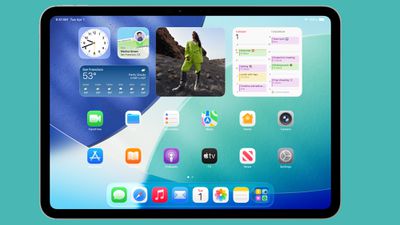
Image : Google
Menu Bar Makes Navigation Feel Mac-Like
One of the most noticeable changes in iPadOS 26 is the introduction of a fully functional macOS-style menu bar. Now, when you swipe down from the top of the screen while using an app, you’ll see a drop-down menu with familiar categories like File, Edit, Format, View, Window, and Help. The first menu shows the app’s name, giving quick access to settings—just like on a Mac. The menu bar isn’t static either; it changes based on the app you're using. In Safari, for example, you’ll see Bookmarks and History options. This makes multitasking smoother and gives users quicker access to core app functions without tapping around. It’s a subtle addition that makes a big difference in how you navigate the iPad, especially if you're used to desktop workflows.
Windowed Apps Boost Productivity on iPad
Perhaps the most Mac-inspired feature in iPadOS 26 is the new Windowed Apps mode, available under Settings ➝ Multitasking & Gestures. This mode allows users to open, resize, and organize multiple app windows in a way that closely mirrors how you’d use windows on a Mac. There’s even a Control Center toggle for quickly switching between Windowed Apps and Stage Manager. Want to stack apps or drag a window to fill half the screen? Done. Want to flick a window to the side to declutter your view? That’s possible too. The intuitive gesture controls make it easy to move between apps while maintaining a clean digital workspace. For users who juggle multiple tasks—whether writing, designing, coding, or researching—this is a game-changer.
Visual Cues and Design Enhancements Deepen Mac Parallels
Another clever addition to iPadOS 26 features is the inclusion of traffic light-style window controls—yes, those red, yellow, and green buttons you see on macOS windows. These buttons appear in the top-left corner of app windows and allow you to close, minimize, or expand windows with a simple tap. It’s a visual cue that feels instantly familiar to Mac users and reinforces the idea that the iPad is more than just a consumption device—it’s now built for real productivity. Combine that with enhanced file management tools, keyboard shortcuts, and the ability to customize your workspace, and you have a tablet that behaves like a lightweight laptop without compromising on portability or battery life.
iPadOS 26 Features Take the iPad to New Heights
Whether you're a student, creative professional, or someone who simply wants more power from their iPad, iPadOS 26 features deliver in a big way. This update doesn’t just borrow from macOS—it adapts core Mac elements for the iPad’s unique interface, making the device more versatile than ever. The combination of touch-first usability with Mac-style multitasking creates a hybrid environment that caters to casual and power users alike. As Apple continues to build a unified ecosystem across devices, iPadOS 26 stands out as a pivotal update that brings the best of both worlds into one sleek experience. If you've been on the fence about using your iPad for serious work, this update might be the one that finally tips the balance.
Post a Comment